Real-time AI noise cancellation for Windows.
Filters out fan roar, mechanical keyboards, room noise, and distant chatter directly on your CPU — free, offline, and lightweight. Works across Discord, Steam, Zoom, and games.
Why I built this
"I built Getsu because I play Dota 2 with friends who are too broke for RTX graphics cards, studio mics, or Krisp subscriptions. Our calls were full of fan roar, mechanical keyboard clatter, and the occasional family drama in the background. I wanted a simple tool that runs locally on any normal CPU, costs nothing, has zero tracking, and gets out of the way."
What Getsu blocks
Getsu cleans your mic audio in real time, cutting out common background noise from gaming setups and shared rooms:
How it works
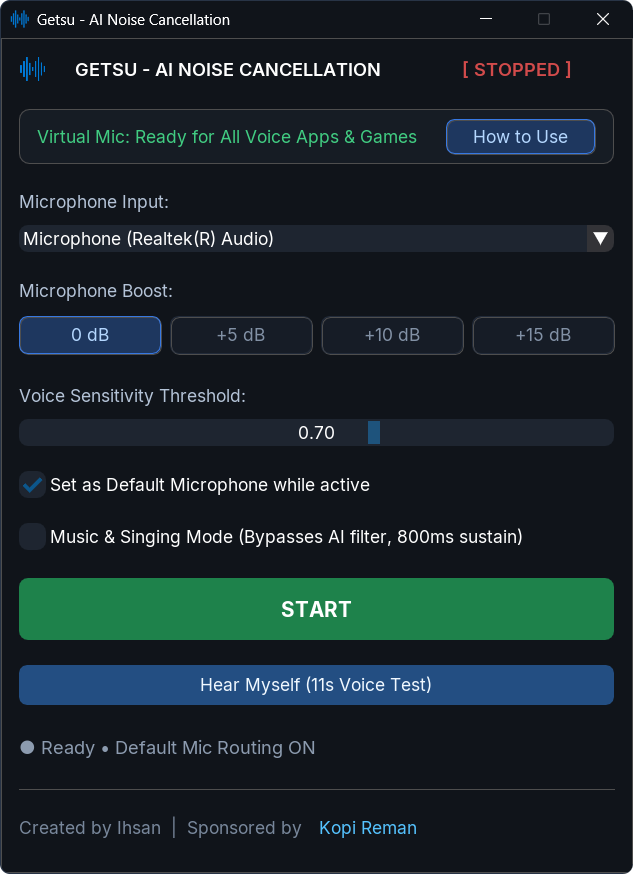
Getsu captures your microphone audio, passes it through an 80Hz low-cut filter, isolates human speech with RNNoise (an open-source recurrent neural network from Mozilla), suppresses transient clicks with an adaptive S-curve gate, and sends the pristine voice to a virtual microphone called CABLE Output.
When you press START, Getsu automatically sets the virtual mic as your Windows default recording device.
Configuring your games and voice apps
Getsu automatically routes clean audio to any app set to your Default microphone. If an app was previously hard-locked to your raw physical mic, set it to Default or CABLE Output:
🎮 Steam Voice Chat
- Open Steam ➔ Settings ➔ Voice.
- Set Voice Input Device to Default (or CABLE Output).
- Turn OFF Steam's built-in Noise Cancellation.
💬 Discord
- Open User Settings (⚙️) ➔ Voice & Video.
- Set Input Device to Default (or CABLE Output).
- Turn OFF Discord's Krisp noise suppression.
🏆 PC Games (CS2, Valorant, Dota, Apex)
- Go to in-game Audio / Voice Settings.
- Verify input device is set to Default System Device or CABLE Output.
- Speak freely — all teammates will hear clean, noise-free audio!
When you press STOP or exit Getsu from the notification tray, your original microphone is restored right away.
Note: The installer bundles the standard VB-Audio Virtual Cable driver. You can untick it during setup if you already have it installed.
Headless Audio Batch Cleaner (getsu-cli)
Getsu includes getsu-cli.exe (available in v1.3.0+), a high-performance console companion tool designed for terminal power users, batch audio post-production, and automated CI pipelines. It executes completely decoupled from the desktop app, allowing you to clean recorded files while Getsu filters your live microphone in the background.
⚡ Quick Clean
Clean single audio files or specify custom output destinations:
getsu-cli --clean recording.wav
getsu-cli --clean in.wav D:\output\clean.wav
📁 Batch Directory
Process all WAV, MP3, FLAC, and OGG files in a folder:
getsu-cli --clean D:\recordings\podcast\
🎧 Stereo & Music Mode
Linked-stereo gating and natural musical sustain:
getsu-cli --clean track.wav --stereo
getsu-cli --clean vocals.wav --music-mode
CLI Options & Flags
| Option / Flag | Description |
|---|---|
--clean <path> |
Input audio file or folder to clean (required). |
--stereo |
Coupled linked-stereo gating tracking master RMS/speech probability across channels (zero stereo wobble). |
--music-mode |
Bypasses RNNoise and extends hangover to 800ms with a gentle 250ms decay for singing and acoustic instruments. |
--auto-level |
Dynamically normalizes quiet speech levels toward -24 dBFS. |
--gain <float> |
Makeup gain boost in decibels (e.g. --gain 3.5). |
--report-json <path> |
Exports frame-by-frame telemetry JSON log for automated acoustic profiling. |
--no-progress |
Suppresses console progress bar (ideal for headless CI/CD scripts). |
--no-stats |
Suppresses summary statistics table. |
--check-devices |
Prints audio endpoints diagnostics report. |
Limits (What you should know)
Every tool has trade-offs. Here is what to expect before installing:
- Windows only: Runs on Windows 10 and Windows 11 (64-bit). There is no macOS or Linux build.
- Needs a virtual audio driver: Requires VB-Cable to route audio between apps (the installer handles this automatically).
- Resource usage: Adds roughly ~1.2ms of audio processing buffer and uses about ~1.5% CPU on a standard quad-core laptop. Zero GPU usage.
- Unsigned installer warning: Getsu is an open-source project and isn't digitally signed with an expensive commercial certificate ($300+/year). Windows SmartScreen or your antivirus might show an "Unknown Publisher" warning on first launch. The source code is completely public, and the installer's SHA-256 checksum is published on the release page.
Frequently Asked Questions
How is this different from Discord's Krisp?
Krisp in Discord only cleans your voice inside Discord calls. Getsu cleans the mic for every app that uses it, including Steam voice chat, Zoom, OBS Studio, and in-game voice chat (like Counter-Strike 2 and Valorant) with no time limits.
Do I need an NVIDIA GPU?
No. Getsu runs entirely on the CPU, so it works on AMD, Intel, and budget laptops without a dedicated graphics card.
Will it hurt my FPS in games?
It shouldn't. It uses a small amount of CPU and zero GPU VRAM. On our test machines it uses around 1.5% CPU, but test it on your setup to confirm.
Does it remove mechanical keyboard sounds and mouse clicks?
Yes. While standalone neural networks can struggle with sharp keystrokes, Getsu pairs RNNoise with an 80Hz rumble filter and an adaptive S-curve noise gate with 10ms lookahead pre-roll. Keystrokes, mouse clicks, and desk thumps are silenced without clipping your voice.
Is it private?
Everything runs directly on your computer. Getsu does not record your audio to disk, never makes network connections for voice processing, and does not ask for an account. The full code is on GitHub if you want to inspect it.